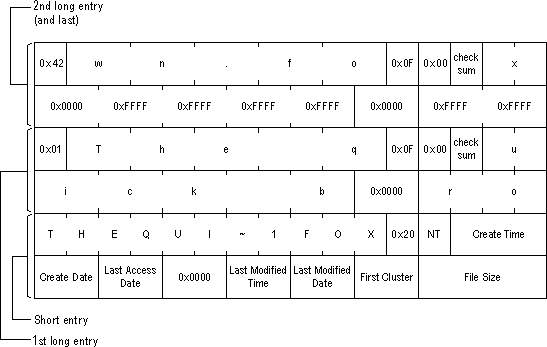
Folders have a set of 32-byte Folder Entries for each file and subfolder contained in the folder (see example figure below).
The Folder Entry includes the following information:
There is no organization to the FAT folder structure, and files are given the first available location on the volume. The starting cluster number is the address of the first cluster used by the file. Each cluster contains a pointer to the next cluster in the file, or an indication (0xFFFF) that this cluster is the end of the file. See File Allocation Table for details.
The information in the folder is used by all operating systems that support the FAT file system. In addition, Windows NT can store additional time stamps in a FAT folder entry. These time stamps show when the file was created or last accessed and are used principally by POSIX applications.
Because all entries in a folder are the same size, the attribute byte for each entry in a folder describes what kind of entry it is. One bit indicates that the entry is for a subfolder, while another bit marks the entry as a volume label. Normally, only the operating system controls the settings of these bits.
A FAT file has four attribute bits that can be turned on or off by the user - archive file, system file, hidden file, and read-only file.
Beginning with Windows NT 3.5, files created or renamed on FAT volumes use the attribute bits to support long filenames in a way that does not interfere with how MS-DOS or OS/2 accesses the volume. Whenever a user creates a file with a long filename, Windows creates an eight-plus-three name for the file.
In addition to this conventional entry, Windows creates one or more secondary folder entries for the file, one for each 13 characters in the long filename. Each of these secondary folder entries stores a corresponding part of the long filename in Unicode. Windows sets the volume, read-only, system, and hidden file attribute bits of the secondary folder entry to mark it as part of a long filename.
MS-DOS and OS/2 generally ignore folder entries with all four of these attribute bits set, so these entries are effectively invisible to these operating systems. Instead, MS-DOS and OS/2 access the file by using the conventional eight-plus-three filename contained in the folder entry for the file.
The figure below shows all of the folder entries for the file Thequi~1.fox, which has a long name of "The quick brown.fox". The long name is in Unicode, so each character in the name uses two bytes in the folder entry. The attribute field for the long name entries has the value 0x0F. The attribute field for the short name is 0x20.
Windows NT/2000/XP and Windows 95/98/ME use the same algorithm to create long and short filenames. On computers that dual-boot these two operating systems, files that were created when running one of the operating systems can be accessed when running the other.
This document is available in PDF format,
which requires Adobe® Acrobat® Reader
(Free download):

