Active@ File Recovery Software Logo
File Recovery DownloadsDownloads
File Recovery OverviewFile Recovery Software
File Recovery ServiceFile Recovery Service
PricingPricing
RequirementsRequirements
File Recovery ScreenshotsScreenshots
File Recovery DocumentationDocumentation
Buy Active@ File Recovery SoftwareBuy Now

Customer Support
Toll Free 1(877) 477-3553
1(905) 812-8434

sales@lsoft.net

Frequently Asked Questions
Support and Re-download

Guide >> Concepts >> Understanding FAT File System >> FAT File Allocation Table


FAT File Allocation Table

The file allocation table (FAT) file system is named for its method of organization by storing entries in a table which resides at the beginning of the volume. To protect the volume, two copies of the table are kept, in case one becomes damaged. The file allocation tables must also be stored in a fixed location so that the files needed to start the system can be correctly located.

The file allocation table contains the following types of information about each cluster on the volume (see example below for FAT16):

  • Unused (0x0000)
  • Cluster in use by a file
  • Bad cluster (0xFFF7)
  • Last cluster in a file (0xFFF8-0xFFFF)

There is no organization to the FAT folder structure, and files are given the first available location on the volume. The starting cluster number is the address of the first cluster used by the file. Each cluster contains a pointer to the next cluster in the file, or an indication (0xFFFF) that this cluster is the end of the file. These links and end of file indicators are shown below.
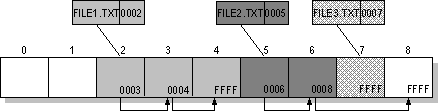
Example of File Allocation Table

This illustration shows three files. The file File1.txt is a file that is large enough to use three clusters. The second file, File2.txt, is a fragmented file that also requires three clusters. A small file, File3.txt, fits completely in one cluster. In each case, the folder entry (see folder entry for details) points to the first cluster of the file.


Back << Contents >> Next

Navigation

Data Recovery Tools

Active@ UNERASER LogoActive@ UNERASER -
a data recovery tool, designed to restore files and directories that have been accidentally deleted or lost.

Active@ Partition Recovery LogoActive@ Partition Recovery -
a partition undelete tool, designed to recover lost and deleted partitions.

Active@ Boot Disk LogoActive@ Boot Disk -
a special bootable CD, designed to allow you to make a data backup, recover lost data, erase data, recover windows passwords.

Disk CleanUp Tools

Active@ Killdisk LogoActive@ KillDisk -
a disk eraser software for secure formatting of hard drives without the possibility of data recovery.

Active@ ZDelete LogoActive@ ZDelete -
your privacy protection tool that prevents undesirable people accessing your privately deleted data.

Home | Partners | Support | Products | Contacts

Active@ File Recovery © 1998-2008 Active@ Data Recovery Software. All rights reserved.

Download Free Version Buy NowLearn More