Each disk consists of platters, rings on each side of each platter called tracks, and sections within each track called sectors. A sector is the smallest physical storage unit on a disk, almost always 512 or 4096 bytes in size.
The cylinder/head/sector notation scheme described in this section is slowly being eliminated. All new disks use some kind of translation factor to make their actual hardware layout appear as something else, mostly to work with MS-DOS and Windows 95.
On hard disks, the data is stored on the disk in thin concentric bands called tracks. There can be more than a thousand tracks on a 3½ inch hard disk.
Tracks are a logical rather than physical structure, and are established when the disk is low-level formatted. Track numbers start at 0, and track 0 is the outermost track of the disk. The highest numbered track is next to the spindle.
If the disk geometry is being translated, the highest numbered track would typically be 1023. The next figure shows track 0, a track in the middle of the disk, and track 1023.
A cylinder consists of a set of tracks that start at the same head position on the disk. In the figure below, cylinder 0 is made up of the four tracks at the outermost edge of the platters. If the disk has 1024 cylinders (which would be numbered 0-1023), cylinder 1023 consists of all of the tracks at the innermost edge of each side of the platter(s).
Most disks used in personal computers today rotate at a constant angular velocity. The tracks near the outside of the disk are less densely populated with data than the tracks near the center of the disk. Thus, a fixed amount of data can be read in a constant period of time, even though the speed of the disk surface is faster on the tracks located further away from the center of the disk.
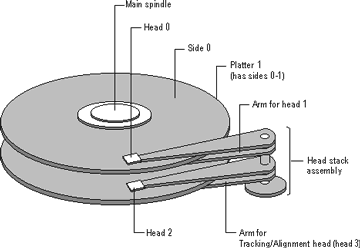
Modern disks reserve one side of one platter for track positioning information, which is written to the disk at the factory during disk assembly. It is not available to the operating system. The disk controller uses this information to fine tune the head locations when the heads move to another location on the disk. When a side contains the track position information, that side cannot be used for data. Thus, a disk assembly containing two platters has three sides that are available for data.
See also Sectors and Clusters
This document is available in PDF format,
which requires Adobe® Acrobat® Reader
(Free download):

