Each track is divided into sections called sectors. A sector is the smallest physical storage unit on the disk. The data size of a sector is always a power of two, and is almost always either 512 or 4096 bytes.
Each track has the same number of sectors, which means that the sectors are packed much closer together on tracks near the center of the disk.
The next figure shows sectors on a track. You can see that sectors closer to the spindle are closer together than those on the outside edge of the disk. The disk controller uses sector identification information stored in the area immediately before the data in the sector to determine where the sector itself begins.
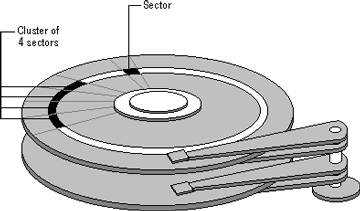
As a file is written to the disk, the file system allocates the appropriate number of clusters to store the file's data. For example, if each cluster is 512 bytes and the file is 800 bytes, two clusters are allocated for the file. Later, if you update the file to, for example, twice its size (1600 bytes), another two clusters are allocated.
If contiguous clusters (clusters that are next to each other on the disk) are not available, the data is written elsewhere on the disk, and the file is considered to be fragmented. Fragmentation is a problem when the file system must search several different locations to find all the pieces of the file you want to read. The search causes a delay before the file is retrieved. A larger cluster size reduces the potential for fragmentation, but increases the likelihood that clusters will have unused space.
Using clusters larger than one sector reduces fragmentation, and reduces the amount of disk space needed to store the information about used and unused areas on the disk.
See also Tracks and Cylinders
This document is available in PDF format,
which requires Adobe® Acrobat® Reader
(Free download):

