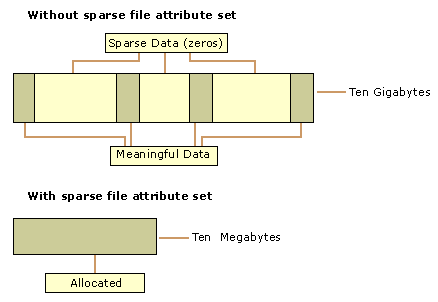
A sparse file has an attribute that causes the I/O subsystem to allocate only meaningful (nonzero) data. Nonzero data is allocated on disk, and non-meaningful data (large strings of data composed of zeros) is not. When a sparse file is read, allocated data is returned as it was stored; non-allocated data is returned, by default, as zeros.
NTFS deallocates sparse data streams and only maintains other data as allocated. When a program accesses a sparse file, the file system yields allocated data as actual data and deallocated data as zeros.
NTFS includes full sparse file support for both compressed and uncompressed files. NTFS handles read operations on sparse files by returning allocated data and sparse data. It is possible to read a sparse file as allocated data and a range of data without retrieving the entire data set, although NTFS returns the entire data set by default.
With the sparse file attribute set, the file system can deallocate data from anywhere in the file and, when an application calls, yield the zero data by range instead of storing and returning the actual data. File system application programming interfaces (APIs) allow for the file to be copied or backed up as actual bits and sparse stream ranges. The net result is efficient file system storage and access. The next figure shows how data is stored with and without the sparse file attribute set.
If you copy or move a sparse file to a FAT volume, the file is built to its originally specified size. If the required space is not available, the operation does not complete.
This document is available in PDF format,
which requires Adobe® Acrobat® Reader
(Free download):

