Each file on an NTFS volume is represented by a record in a special file called the master file table (MFT). NTFS reserves the first 16 records of the table for special information. The first record of this table describes the master file table itself, followed by a MFT mirror record.
If the first MFT record is corrupted, NTFS reads the second record to find the MFT mirror file, whose first record is identical to the first record of the MFT. The locations of the data segments for both the MFT and MFT mirror file are recorded in the boot sector. A duplicate of the boot sector is located at the logical center of the disk.
The third record of the MFT is the log file, used for file recovery. The log file is discussed in detail later in this chapter. The seventeenth and following records of the master file table are for each file and directory (also viewed as a file by NTFS) on the volume.
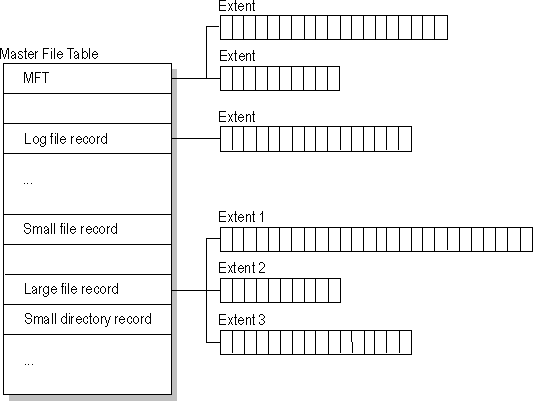
The master file table allocates a certain amount of space for each file record. The attributes of a file are written to the allocated space in the MFT. Small files and directories (typically 1500 bytes or smaller), such as the file illustrated in the next figure, can entirely be contained within the master file table record.

This design makes file access very fast. Consider, for example, the FAT file system, which uses a file allocation table to list the names and addresses of each file. FAT directory entries contain an index into the file allocation table.
When you want to view a file, FAT first reads the file allocation table and assures that it exists. Then FAT retrieves the file by searching the chain of allocation units assigned to the file. With NTFS, as soon as you look up the file, it's there for you to use.
Directory records are housed within the master file table just like file records. Instead of data, directories contain index information.
Small directory records reside entirely within the MFT structure. Large directories are organized into B-trees, having records with pointers to external clusters containing directory entries that could not be contained within the MFT structure.
This document is available in PDF format,
which requires Adobe® Acrobat® Reader
(Free download):

